Forty-something open tabs, a fan that never stopped spinning, and a "new tab" that did nothing. So I built a small dashboard for myself: and one by one, it killed the problems I'd been living with.
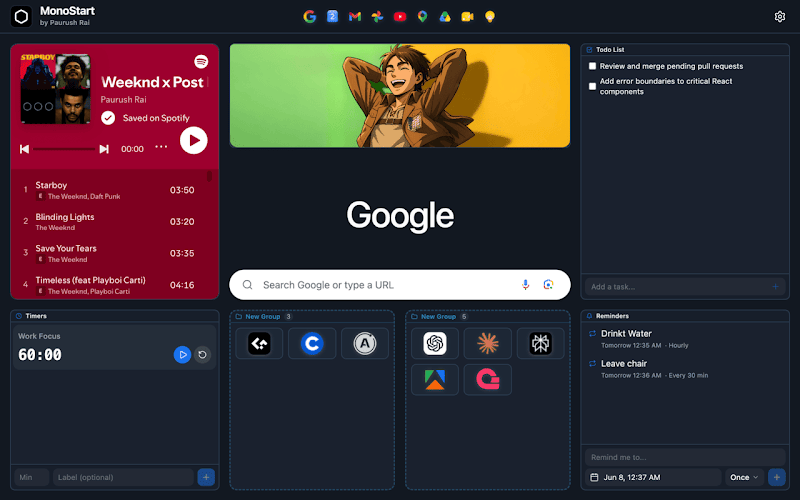
I open a new tab maybe 200 times a day, it's the most-visited "page" in my computing life. And for years it gave me nothing but a search bar and a grid of sites Google guessed at. The most-trafficked real estate in my browser was dead space.
But the blank page wasn't the real problem. The real problem was everything I did to cope with it. Here's what I was fighting, and what went away.
🗂️ Problem: I Hoarded Tabs to Avoid Re-Typing URLs
The Jira board, the docs, three Notion pages, the calendar, that one Stack Overflow tab I "might need", all kept open, grouped into neat colored tab groups so they looked organized. Across three profiles.
It felt productive. It wasn't. Every tab is a live, memory-hungry process Chrome keeps warm. I wasn't organizing my work: I was paying a RAM-and-fan tax to avoid re-typing URLs.
The fix: I realized I wasn't keeping the page, I was keeping the pointer. A link costs nothing; a tab costs a process. So I built one fast place to hold the links: pinned to the header, sorted into groups, one click away.
Gone: the 40-tab wall, the fan, the RAM tax. I open what I need and close it.
🤔 Problem: Every Dashboard I Tried Created New Problems
I tried the existing new-tab extensions first. Each traded my blank page for something worse:
- They felt like a foreign app: moved the search bar, hid my history, broke my muscle memory. → Mine keeps the real Google search bar, my real history suggestions, and Chrome's own look.
- They wanted an account and a cloud sync with "analytics partners." → Mine has no login and no backend.
- They monetized me: sponsored links, telemetry. → Mine has zero ads and zero tracking.
- They were heavy: half a second of spinner. → Mine is the new tab page: instant, no spinner.
I wanted a page that was completely mine yet felt like I'd installed nothing. So the one rule I refused to break: you shouldn't be able to tell where Chrome ends and the dashboard begins. I hit ⌘T and I'm home, same search, same reflexes, just with my stuff on it.
👥 Problem: Three Profiles, One Dead Page for All of Them
I split browsing across Chrome profiles, personal, company, freelance: but all three landed on the same blank tab. Switching profiles changed my logins and nothing else.
The fix: everything is stored locally, per profile (chrome.storage.local), so each profile gets its own independent dashboard for free: personal opens to reading lists and side projects, work to Jira and a "standup at 10" reminder, freelance to client folders and a billable-hours timer.
Gone: context bleed. Switching profiles is now switching workspace, the dashboard tells me which version of myself I'm being.
⚡ Problem: The Gap Between "I Need a Site" and "I'm There"
Reaching a site was a ritual, ⌘L, type, wait, land: or worse, hunting through twelve tab groups for the tab I swore I'd left open.
The fix: my most-used sites are pinned to the header; the rest live in colored groups. On any page worth keeping, the toolbar icon files it in one click: to the grid, the header, or a group.
Gone: the gap. ⌘T → it's there → click. Multiply a saved second or two across 200 tabs a day and it stops being a rounding error.
🛠️ The Problems Each Widget Quietly Killed
I set out to replace a blank page; it became where my small daily annoyances go to die. Each started as a problem, not a feature: all local, one keystroke away:
- 🔔 I kept missing standups and over-steeping tea. Reminders fire as real notifications with a chime: even with every tab closed, even through Do Not Disturb. The one I lean on hardest.
- ⏱️ I lost track of time heads-down. Labeled timers ("Tea", "Standup") run side by side. Time-boxing finally stuck.
- ✅ My to-do list lived where I never looked. Now the checklist and sticky notes sit on the page I open 200 times a day.
- 🌐 I had tabs open just to glance at one thing. Embedded mini-widgets, a calendar, a status board: glanceable with no dedicated tab.
- 🎨 Other people's themes never matched my setup. Light, dark, or follow-my-OS, with custom accents and my own wallpaper.
🔒 The Problem I Refused to Trade Away
Every fix could have come with a hidden cost: handing my data to someone's server. I wouldn't. So: no accounts, no servers, no analytics, no ads. Everything lives in chrome.storage.local; there's nowhere to upload it because there's no backend. The only thing that leaves the browser is what I type into search, sent to Google for autocomplete like any search bar.
The honest trade-off: local data doesn't sync across machines. For a new tab page, I'll take that every time.
🧰 For the Curious
A Manifest V3 extension, React 19, TypeScript, Vite, Tailwind, shadcn/ui, source-available under the PolyForm Noncommercial License, so you can read every line and verify the privacy claims aren't marketing. It requests only the permissions its one job needs.
Is your new tab a wall of tab groups cooking your laptop too?
I built this to fix my own browser. If yours is dead space, or forty tabs kept open just to avoid re-typing URLs, I'd bet the shape of your problem looks a lot like mine did.
👉 MonoStart on the Chrome Web Store
Free, private, and within five minutes the most-opened page in your browser can finally start working for you. Curious what your own new-tab workaround looks like, and whether it's actually working or just something you've stopped noticing.