I published an article about surviving machine migrations. A week later, I discovered my own setup had already failed: and fixing it took git, symlinks, launchd, and one humbling afternoon.
A week ago, I published an article about workspace architecture.
The thesis was confident:
If my machine died today, I should be able to rebuild everything from a single directory.
Everything under ~/Developer/. Repositories. Infrastructure. Data. One directory, fully portable.
I was feeling pretty good about it.
Then, a few days later, I asked my AI assistant to back up my Claude Code skills folder into the new structure.
It came back with something I didn't expect:
ls: /Users/paurushrai/.claude/skills/: No such file or directoryThe folder didn't exist.
But I had skills. A custom one called graphify, I'd built it, used it daily, and my global config still referenced it. So where was it?
/Users/paurushrai/Downloads/mac-restore/dot-claude/skills/graphify/There it was. In my Downloads folder. Inside a directory called mac-restore.
Sitting there since the day I migrated machines. Never restored. Forgotten.
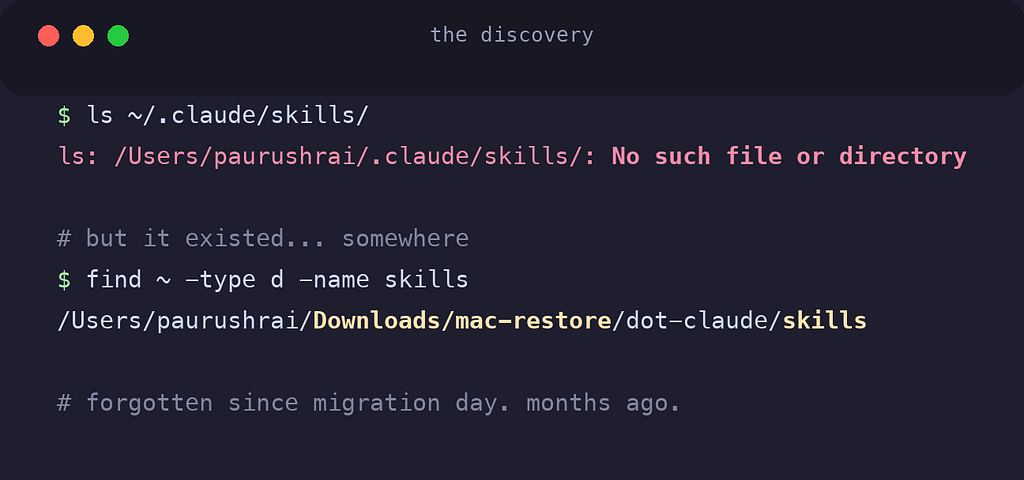
I had written an entire article about exactly this failure mode: and my own machine was quietly living it the whole time.
🔍 The Blind Spot
Here's what I had missed.
My architecture organized everything inside ~/Developer/. But the configuration that makes a machine feel like mine doesn't live there:
- Git identity and behavior,
~/.gitconfig - Shell setup,
~/.zshrc,~/.zprofile - Global ignores,
~/.gitignore_global - AI coding rules,
~/.claude/CLAUDE.md - Custom AI skills:
~/.claude/skills/ - And the most invisible one of all: the list of installed packages, which lives nowhere
All of it scattered across $HOME. Unversioned. Unbacked-up. Invisible to my beautiful directory structure.
When I checked ~/.gitconfig to assess the damage, it was worse than I thought:
cat ~/.gitconfig
# → no such file
The file didn't exist. On the old machine I'd had email routing set up: personal email for my projects, work email for company repos. None of it had survived. I'd been committing for months without noticing.
The code had migrated. The configuration hadn't.
🔗 The Oldest Trick in Unix
My first instinct was the obvious one: create a backup folder, copy the dotfiles in, push it to GitHub.
But copies drift. The moment there are two versions of .gitconfig, one of them is a lie: and you won't know which one until something breaks.
The fix is older than I am: symlinks.
There is only one file. It lives in the repo. The home directory gets a pointer:
~/.gitconfig  ──symlink──▶  ~/Developer/infra/dotfiles/.gitconfig
                            └── the ONLY real file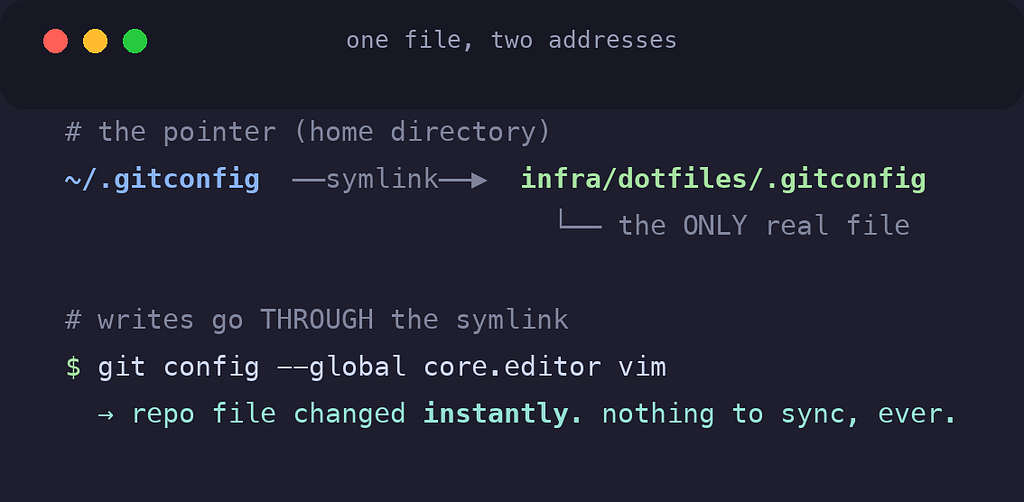
When I asked whether this meant I'd have to keep syncing changes back, I got the answer that makes this whole design work:
Writes go through the symlink.
Run git config --global to change a setting, git follows the pointer and writes into the repo file directly. Edit ~/.zshrc: you're editing the repo file. There's nothing to sync, because there's nothing to sync from. One file, two addresses.
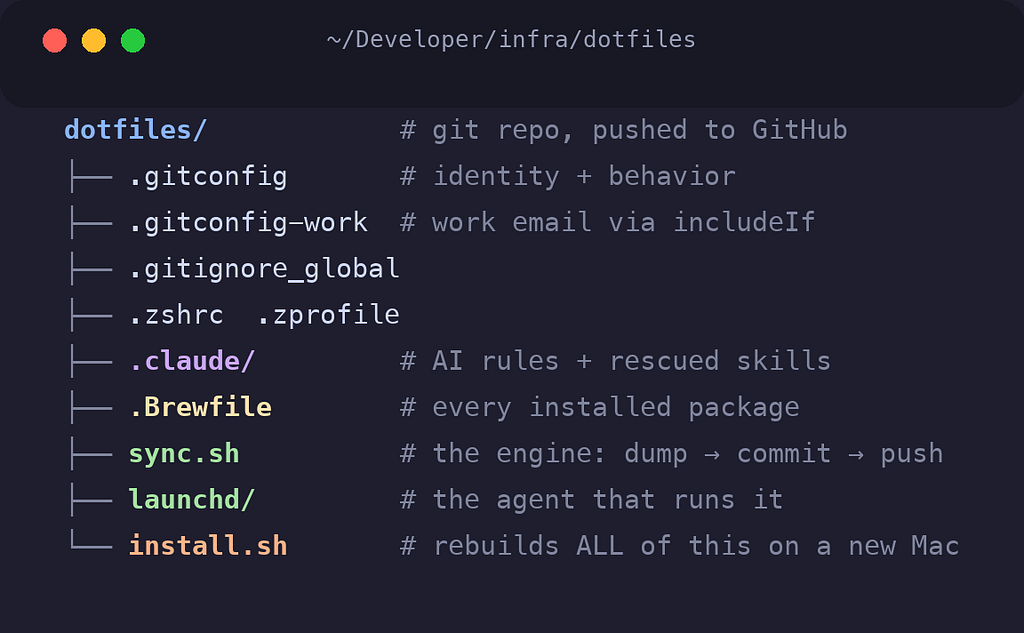
So that's what I built. A dotfiles repo inside my infrastructure layer, holding the real files, with an idempotent install.sh that recreates every symlink on a fresh machine: backing up whatever it finds first, safe to run twice.
Git config, shell config, global ignores, my AI rules, the rescued graphify skill. Committed. Pushed. Permanent.
One rule, learned from inspecting what almost went into the repo: never commit secrets. My .zshrc now sources a ~/.zshrc.local that git never sees. The repo gets the structure; the machine keeps its secrets.
I thought I was done.
🍺 Homebrew Doesn't Keep a Diary
Then I tried to answer a simple question: if this machine died, what would I reinstall?
Git config has a beautiful property: the tool writes to its own config file, so the repo always knows the truth. Homebrew has no such manners. brew install jq installs the package and records the decision nowhere. The package list exists only implicitly, as folders in /opt/homebrew/Cellar.
Homebrew can dump a manifest on demand:
brew bundle dump --global --force
# → writes .Brewfile: brew "gh", brew "git", brew "tree"...
So I symlinked a .Brewfile into the repo like everything else. But there was a catch, and it nagged at me:
The Brewfile only updates when you remember to dump it.
My whole design was built on the premise that I don't remember. That's the entire reason the symlinks exist. A manifest that depends on my discipline is a manifest that's three months stale by the time I need it.
🧪 My First Attempt Was Wrong
The first solution felt clever: wrap the brew command in a shell function. Intercept every install and uninstall, re-dump the manifest, auto-commit, auto-push.
I built it. It worked on the first try:
$ brew install jq
...
$ git log --oneline -1
df053cb chore(brew): install jq
Beautiful. Commit message names the package and everything.
And then I looked at it again and saw the hole.
A shell wrapper only catches commands typed into my interactive shell. A setup script installing dependencies? Invisible. An AI agent running brew inside a session? Invisible. Any context that isn't my zsh with my config loaded? Invisible.
I had automated the interface when I needed to automate the event.
The package install itself is the event, and it happens in the filesystem, not in my shell.
⚙️ The OS Already Had the Answer
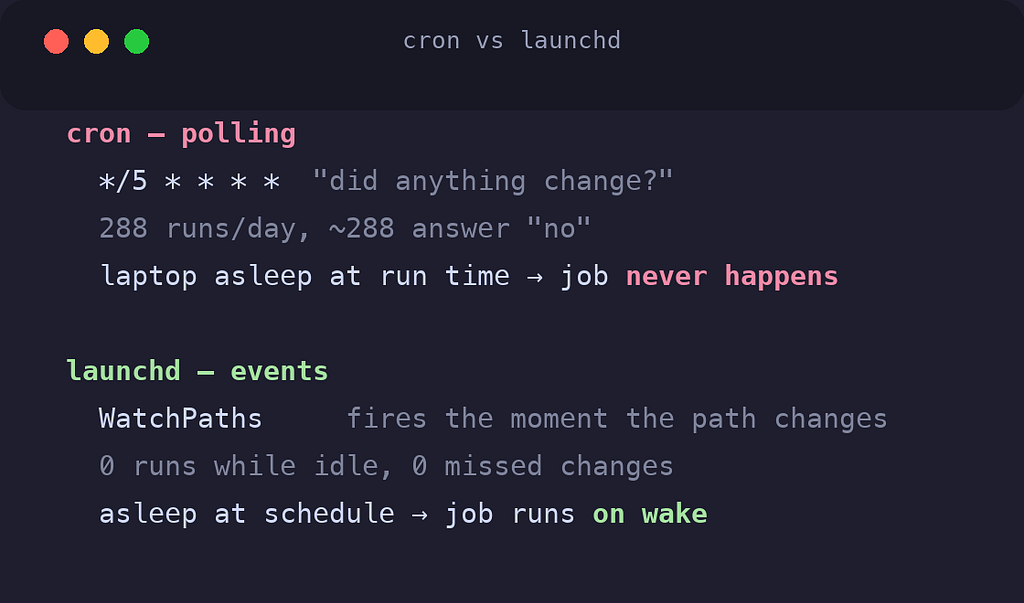
I asked: can we use launchd for this?
launchd is macOS's service manager: the thing that starts every daemon on the system, Apple's answer to systemd. Every Mac developer has seen it. Almost nobody uses its best feature:
WatchPaths: launchd will watch a path at the OS level and fire a job the moment it changes.
<key>WatchPaths</key>
<array>
    <string>/opt/homebrew/Cellar</string>
    <string>/opt/homebrew/Caskroom</string>
</array>
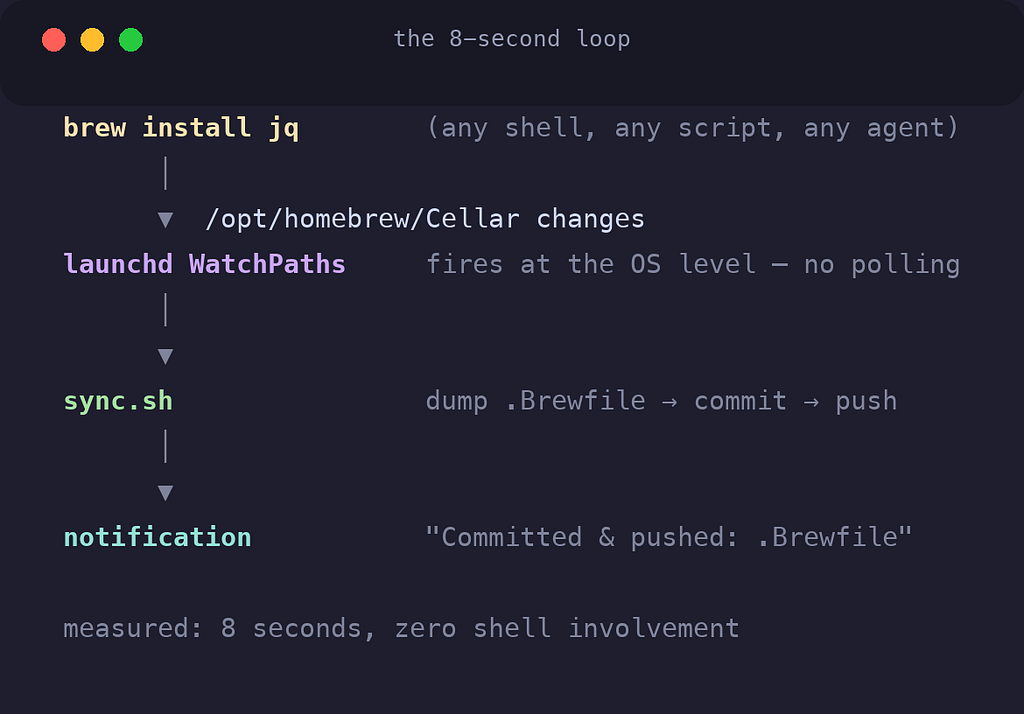
Now it doesn't matter who installs the package, my shell, a script, an agent, anything. The Cellar changes, the OS notices, my sync script runs:
# sync.sh, the whole engine
brew bundle dump --global --force    # snapshot packages
git add -A                           # stage any dotfile drift
git diff --cached --quiet && exit 0  # nothing changed? exit silently
git commit -q -m "chore: auto-sync ${CHANGED}"
git push -q                          # offline? commits locally, pushes next time
Plus a daily run at noon as a catch-all, and a 60-second throttle so installing five packages produces one commit instead of five.
Then the test. Install a package, touch nothing else, watch:
$ brew install jq
... 8 seconds later, zero shell involvement:
67ba27e chore: auto-sync .Brewfile
→ pushed to GitHub ✅
Eight seconds. The machine documented its own change, committed it, and pushed it while I sat there.
I deleted the shell wrapper the same minute. No third-party tools, no cron polling on a timer, no daemon to install. The OS had shipped the answer all along.
Once that worked for packages, the next step was obvious: watch the dotfiles themselves. Now editing .zshrc or my AI rules auto-commits within a minute, with the filename in the commit message.
🔁 The Trap I Almost Built
One decision here will bite anyone who builds this, so it's worth the confession.
The lazy version is to watch the repo's root directory: one watch entry, covers everything.
But every git commit mutates .git/. Watch the repo root and you've built an ouroboros: change fires the agent → agent commits → the commit changes .git/ → which fires the agent → forever.
So the agent watches individual files, never the directory that contains .git. The trade-off: a brand-new file in a deep subdirectory isn't caught instantly, the daily run sweeps it up instead. That's documented in the README, and it's a fair price.
Automation that triggers itself is the kind of bug you find at 2am.
🔔 Teaching It to Speak
There was one problem left, and it was about trust.
The agent was now committing on my behalf, silently. A silent daemon is a daemon you stop trusting, or worse, forget exists.
The script got two lines of macOS-native notification:
osascript -e 'display notification "Committed & pushed: .Brewfile" with title "dotfiles sync"'First test: I never saw it. Banners fade in five seconds, and I was looking elsewhere.
The fix wasn't code: it was one setting. macOS notifications have two styles, and almost nobody changes the default: System Settings → Notifications → Script Editor → Alerts. Alert-style notifications stay on screen until you dismiss them.
Now every sync waits in the corner for me to acknowledge it, with the changed filenames in the message. My machine's config history, delivered as receipts.
And it only speaks when something actually changed: a no-op sync stays silent. A notification you get every minute is a notification you've already learned to ignore.
🎭 The Paranoid Question
Just when everything worked, I thought of the question that breaks most setups like this:
What happens when I log into GitHub with my work account?
I went looking, and found that "logged into GitHub" is actually three independent layers that most people have never separated:
Layer 1: who wrote the commit? Decided by git config, full stop. A commit is a local file write; GitHub isn't even contacted. My includeIf rule routes company repos to my work email, everything else to personal. CLI logins can't touch this.
Layer 2: who's allowed to push? Decided by the credential in the macOS keychain. And here's the fragile part: the keychain stores credentials per host. Two accounts, one github.com: the second login can silently overwrite the first, and suddenly my sync agent is pushing with the wrong identity and collecting 403s.
Layer 3: who does the gh CLI act as? Whatever account is active. Irrelevant to my sync, which speaks pure git.
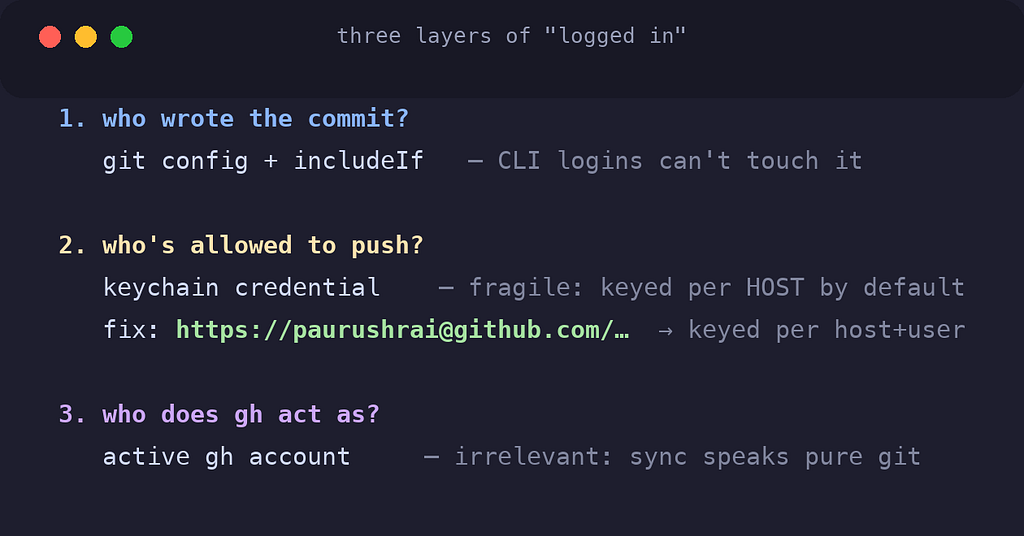
Layer 2 was the real exposure, and the fix is a single line:
git remote set-url origin https://paurushrai@github.com/paurushrai/dotfiles.gitThat paurushrai@ isn't an email: it's URL syntax, the same user@host as ssh. With a username in the URL, the keychain files credentials under host + username. Separate accounts, separate drawers, no overwrites possible.
The principle is the same one behind the email routing, and it's worth framing:
Identity should be a property of the repo, not of global mutable state.
🚀 The Ten-Minute Machine
Here's where the story ends up.
The next time I unbox a Mac, this is the entire procedure:
# 1. Homebrew, then the two bootstrap tools
brew install gh git
gh auth login
# 2. Clone the config, link everything, reinstall every package
gh repo clone paurushrai/dotfiles ~/Developer/infra/dotfiles
~/Developer/infra/dotfiles/install.sh
brew bundle --global# 3. Re-authenticate: credentials never migrate, by design
claude loginAnd the part I find genuinely satisfying: install.sh doesn't just restore the config. It bootstraps the launchd agent too.
The new machine doesn't receive a snapshot of my setup. It receives the system that maintains my setup: and starts maintaining itself from minute one.
What I deliberately left out matters as much:
- Credentials: the backup for a secret is logging in again. Ten seconds, by design.
- Caches, session state, build artifacts: rebuilt naturally. Backing them up is hoarding.
- The data layer, Postgres and Redis volumes are large, live, mutating binaries. Git is the wrong tool, and copying a running database produces corrupt garbage. Data needs real snapshot backups, that's the next article.
🎯 What I Actually Learned
The previous article's lesson was: your workstation is a system: architect it.
This week taught me the corollary: a system maintained by discipline will decay. A system that maintains itself compounds.
Look at the shape of every fix in this story:
- I would forget to copy config files → so there's one file, symlinked, no copies
- I would forget to update the package manifest → so the OS watches the filesystem
- I would forget to commit → so the agent commits
- I would miss silent failures → so notifications wait until I dismiss them
- I would forget to set all this up again next time → so the installer reinstalls the automation itself
Every single one replaces "remember to" with "it just does."
That skill file sat dead in my Downloads folder for months because restoring it depended on me remembering it existed. Nothing on my machine depends on my memory anymore.
And honestly, that's the best feature I've ever shipped to myself.
What does your config layer look like?
Dotfiles repos are an old idea. But most of them stop at "files in a repo with an install script": the part that keeps the repo true after day one is where it gets interesting.
The tooling will keep changing. The architecture should survive it.