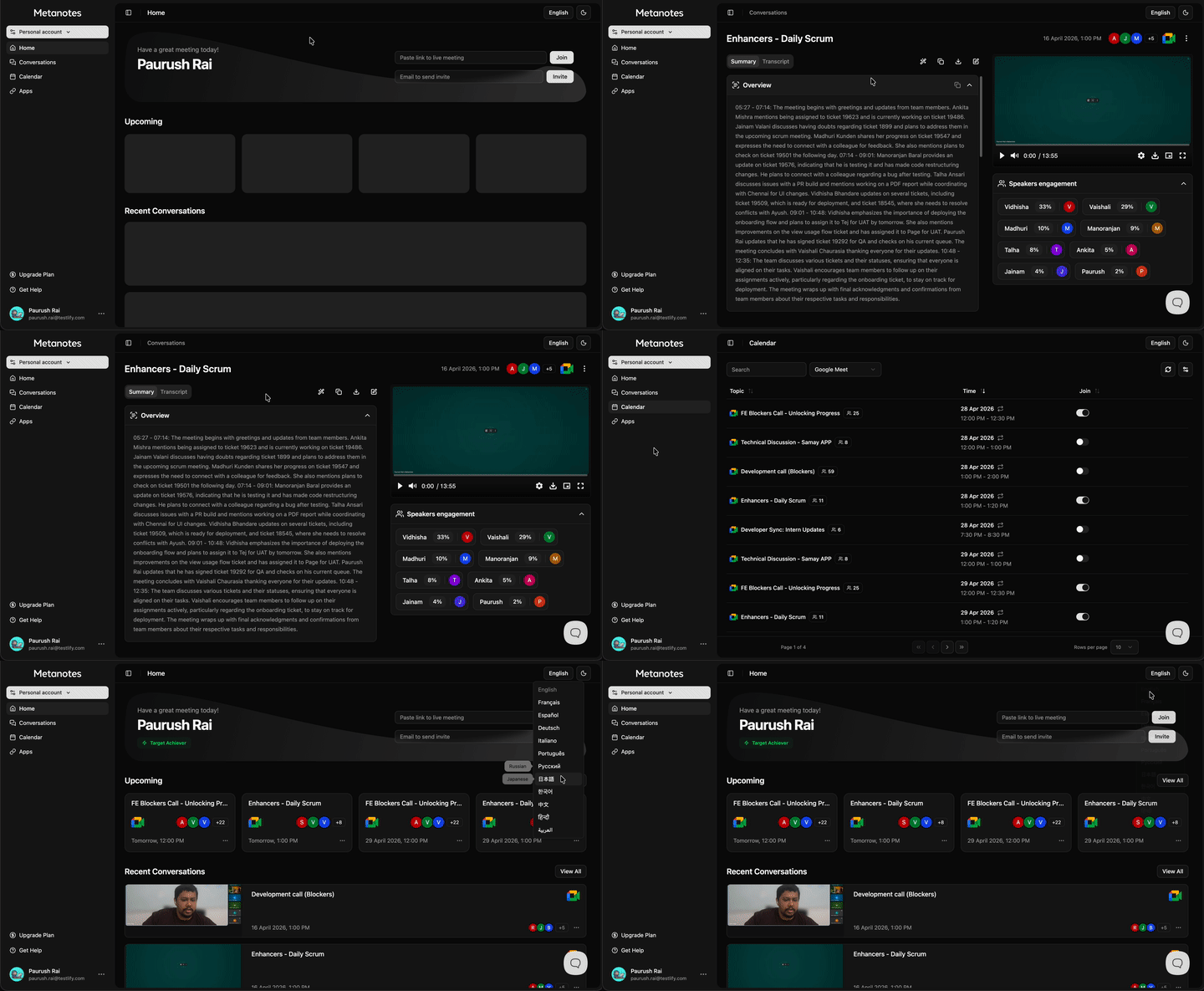
MetaNotes is an AI meeting assistant that joins Google Meet, Microsoft Teams, and Zoom calls to generate transcripts, action items, and conversation summaries. It is deployed as a public product and internally replaced Fireflies and tl;dv, whose gated features and rising storage costs no longer fit the team's needs. I was the sole frontend engineer on the project, owning feature scope, deployments, and product decisions end to end over a roughly 5-month build.
What I built
- Transcript interface: Built a transcript viewer with timestamp-synced highlighting. The active line tracks video playback position, and clicking any line seeks the player to that moment.
- Meeting intelligence dashboard: Developed interactive views for AI summaries, action item tracking, sentiment indicators, and topic tags.
- Frontend architecture: Sole frontend engineer on the project from initial concept to production. Feature scope, component architecture, state management, and deployments were mine to own. The backend pipeline is async and webhook/cron-driven: transcripts and summaries are fetched once processing completes, not streamed live.
Why it mattered
MetaNotes launched as a public SaaS product and was adopted internally by 200+ Testlify employees for meeting recording and client calls, replacing Fireflies and tl;dv. That eliminated $24,000 in annual operational costs previously paid to those vendors.
Led the Project, Ownership End to End
I led MetaNotes as the frontend engineer, and the ownership extended past the UI. Feature scope, deployments, and day-to-day product decisions were mine as well. From first commit to internal launch took roughly 5 months.
Why Transcripts Show Up After the Meeting, Not During It
MetaNotes doesn't stream transcript text while the bot is in a call. During capture, the UI shows only a status badge (Capturing/Paused) with pause/resume/stop controls. Ingestion runs through Attendee's webhook (the meeting-bot API that joins the call and captures media) and a set of scheduled cron jobs: transcription and OpenAI summarization happen asynchronously after the call ends, and the frontend fetches the finished transcript, summary, and action items once, in a single server action call.
Given a five-month timeline that also covered feature scope, deployments, and product decisions, live streaming wasn't worth its cost. It would have meant a WebSocket connection to manage, partial-transcript reconciliation, and reconnect handling, all for a capability (watching the transcript build in real time) that wasn't what users actually needed. Async ingestion after the call ends delivers the same transcript, summary, and action items with far fewer moving parts, so that's what shipped.
Timestamp-Synced Transcript Highlighting
A plain two-way binding between the video player and the transcript list: a timeupdate listener tracks playback position, a scan over the transcript array finds the currently active line and highlights it, and clicking any line seeks the player to that timestamp. At typical meeting length this doesn't need a virtualized list or a dedicated sync library. Reaching for either would be solving a problem the data doesn't have yet.
Data Model & Scale
- Transcript stored as a single JSON blob per conversation, not chunked or paginated at the database level.
- Conversation and calendar lists paginate at 10-20 items per page.
- Summarization calls to OpenAI are capped at 800 output tokens per request.
These hold up fine at current meeting volume and length. The single-blob transcript column and the linear-scan highlight lookup are the two things I'd revisit first if either grew by an order of magnitude. Known tradeoffs, not blind spots.
Build vs. Buy
Testlify was paying for Fireflies and tl;dv, but both gated key features behind higher pricing tiers and grew more expensive as recorded-meeting storage piled up. Building in-house removed both constraints; once adopted internally by 200+ employees for meeting recording and client calls, it cut the $24,000 a year previously spent on those vendors.
Stack
Next.js 16 / React 19 App Router, TypeScript, Zustand for client state (with localStorage persistence), Clerk for auth, Radix + Tailwind for UI, Vidstack for the recording player, Attendee as the meeting-bot API for Zoom/Meet/Teams capture.