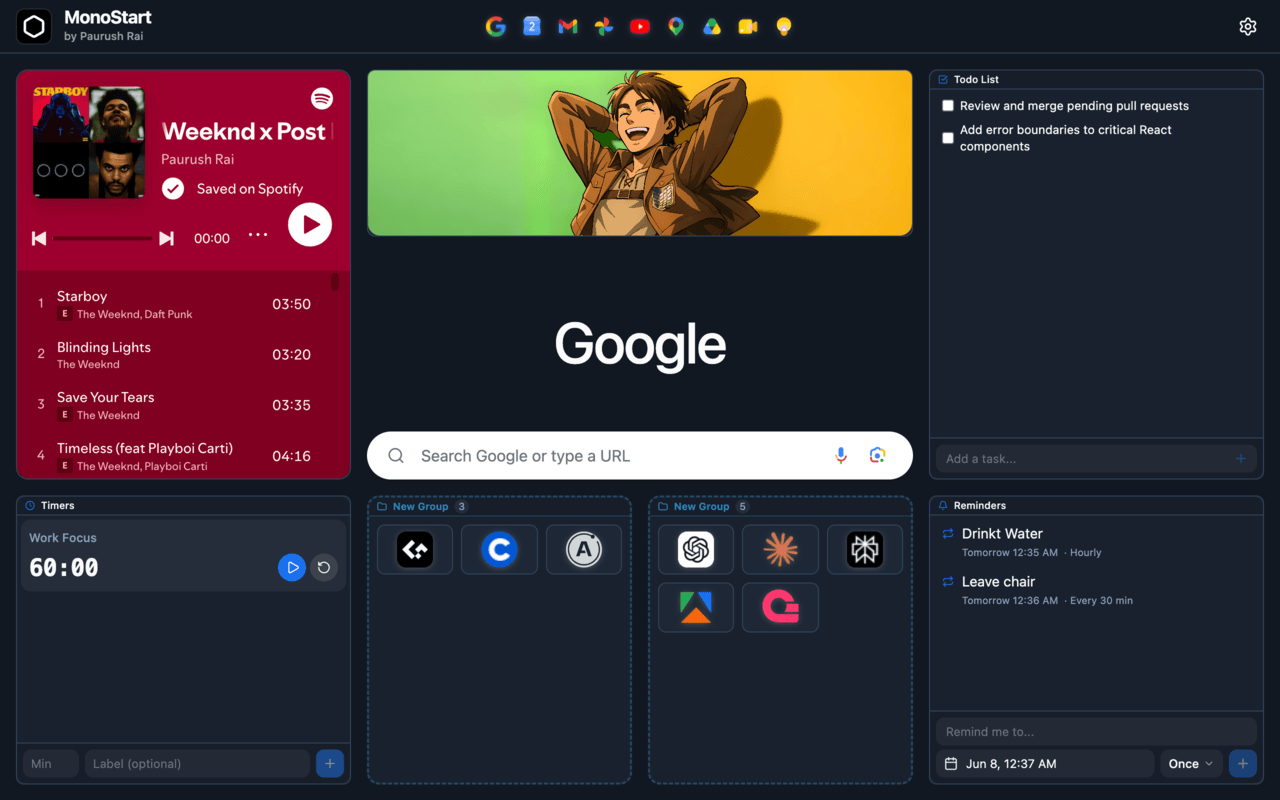
MonoStart transforms the default browser new-tab page into a fast, customizable personal dashboard. It organizes bookmarks, task lists, quick notes, and focus timers into a configurable workspace. Built as a Manifest V3 Chrome extension, it stores everything locally on-device: no accounts, no server database, no analytics.
What I built
- Customizable dashboard: A drag-and-drop grid, including nested widget groups, where widgets (quick links, categorized folders, notes, to-do lists, countdown timers, reminders, voice search, and Google Lens visual search) can be arranged to match any workflow.
- Quick access layout: Pinned links in the header and grouped folders replace deep bookmark menus, keeping frequently accessed sites one click away.
- Theme customization: 15 built-in color themes reverse-engineered from Chrome's own "Customize Chrome" palette, a custom hex picker, light/dark mode support, and gradient or wallpaper backgrounds.
- Productivity tools: Built-in countdown timers and scheduled reminders with local audio alerts and desktop notifications.
- Local-first storage: Notes, to-dos, layout, and images live in chrome.storage.local and IndexedDB on-device. No user accounts and no server database; the one network call is to Google's public suggest API for search autocomplete, the same one Chrome's own address bar uses.
Why it mattered
The new-tab page is opened dozens of times daily. MonoStart turns that empty space into an instant, local-first productivity dashboard that respects your privacy: your data never leaves the device.
Why This Exists
I open a new tab around 200 times a day, and for years it gave back nothing: a search bar and a grid of sites Google guessed at. The actual problem wasn't the blank page, it was everything I did to cope with it. Forty-plus tabs kept open across three Chrome profiles just to avoid re-typing URLs, each one a live process Chrome kept warm. I wasn't organizing my work, I was paying a RAM-and-fan tax to hold onto pointers, not pages. Every existing new-tab extension I tried traded that blank page for something worse: a foreign UI that broke muscle memory, an account and cloud sync, sponsored links, telemetry. I'm the only contributor, 222 commits since June 2026, still actively maintained, built to fix my own browser first and shipped as a live, public extension second.
The One Rule: Look Like Chrome, Not an App
Every decision in this codebase answers to one constraint: you shouldn't be able to tell where Chrome ends and the dashboard begins. That's why the real Google search bar stays, with real Chrome history suggestions, instead of a custom search UI that would need its own history index. It's why there's no onboarding flow, no login screen, no account system: opening a new tab should feel like nothing was installed at all. A feature that made the page feel like a separate app, no matter how useful, didn't ship.
Audio in a Service Worker That Can't Play Audio
Manifest V3 background scripts are service workers, and service workers can't reliably play audio directly. Chrome suspends and tears them down whenever it wants to reclaim memory, mid-playback included. Reminders still need a sound that actually fires. The fix uses chrome.alarms to schedule the reminder, since alarms survive a killed service worker and wake it back up, and routes playback through a chrome.offscreen document instead of the service worker itself, a hidden page Chrome keeps alive specifically for tasks like this. It's the same class of workaround most MV3 extensions eventually hit, since a persistent background page no longer exists in MV3.
Themes Reverse-Engineered From Chrome Itself
Rather than invent an arbitrary color palette, MonoStart's 15 built-in themes are extracted from Chrome's own "Customize Chrome" seed colors, with the extraction process documented step by step in the repo. An early version of that extraction had a hue-shift bug. The fix shipped in v1.1.1 with a migration path for anyone who'd already picked a theme under the old math, so existing users didn't wake up to a different color than the one they chose.
Security: Sanitizing Embeds Without Trusting the Sanitizer Alone
Image and embed widgets accept arbitrary HTML, sanitized through DOMPurify before render. DOMPurify alone wasn't enough: it doesn't strip a srcdoc attribute, and an iframe with srcdoc set inherits the extension's own origin, a real XSS path if the extension's CSP ever loosened. srcdoc is stripped explicitly in the sanitizer regardless of what DOMPurify allows on its own, a second, independent layer instead of trusting one library completely.
Data Model & Scale
- Text data (notes, to-dos, layout, reminders, settings) lives in chrome.storage.local.
- Wallpaper and background images live in a separate IndexedDB database instead, with orphan-reference garbage collection so deleted or replaced images don't silently accumulate.
- chrome.storage.local's roughly 10MB cap is lifted via the
unlimitedStoragepermission, needed once images moved off that quota entirely. - 216 tests across 25 files (Vitest, jsdom, fake-indexeddb) cover this storage layer directly, not just the UI on top of it.
Local-only storage is a deliberate tradeoff, not an oversight: it means no sync across machines or profiles, but it's the same mechanism that gives three Chrome profiles their own independent, isolated dashboard for free, without a shared account system to build and secure. Search-bar autocomplete is the one network call in the whole app, hitting Google's public suggest API the same way Chrome's own address bar does; everything the user actually creates stays local.
Build vs. Buy
No custom drag-and-drop engine: react-grid-layout handles the grid, including nested groups, instead of reimplementing collision detection and resize handles from scratch. No custom component library: shadcn/ui's pattern of copying Radix-based components in directly (rather than installing an opaque UI package) keeps every component's code, and any deviation from it, visible and editable. No custom localization pipeline: react-i18next plus a growing set of locale files (50+ languages) instead of hand-rolled string lookup.
Stack
React 19, Vite, TypeScript, Tailwind CSS, shadcn/ui on Radix UI primitives, react-grid-layout for the dashboard grid, react-i18next for localization, DOMPurify for embed sanitization, Vitest for tests, Chrome's Manifest V3 extension platform (chrome.alarms, chrome.offscreen, chrome.storage, IndexedDB), licensed under PolyForm Noncommercial 1.0.0.